
When it’s time to start a session, follow the steps below to start it and allow your participants in, or if you want to end the session, follow the next steps under ‘Ending a session’ title,
Starting a session
Choose ‘Virtual Event’ from the left side menu,
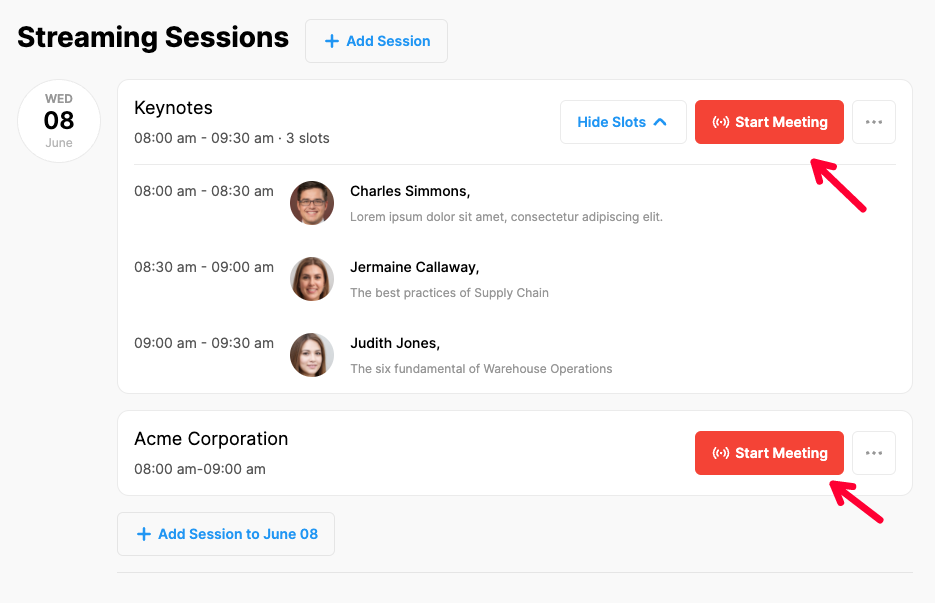
Choose the ‘Streaming Sessions’ option under the ‘VIRTUAL EVENT SETTINGS’ title,
Click the ‘Start Meeting’ button of the session you want to start,
If you are the admin but not the host, click the ‘Start Meeting as Host’ button,
If required, allow cam and mic from your browser settings,
Choose the cam and mic you prefer to use, then complete the camera and sound tests,
Click the ‘Checked All’ button, (this step starts the virtual session),
Turn on your cam and mic by clicking the relevant icons at the bottom of the screen.
Ending a session
If your session is over and you want to end the session just click the ‘End Meeting’ button at the left bottom corner of your screen.

Note that, ending a session ends it for all the participants.
Comments
0 comments
Please sign in to leave a comment.