
MeetingHand allows you to show the registration and service fees as tax-included prices on your invoices, and to reflect the tax amounts on the invoice if you define a tax type similar to VAT.
Once you define a tax type, you can define a common tax rate for all services you provide, or you can apply specific rates for each registration type and service you sell.
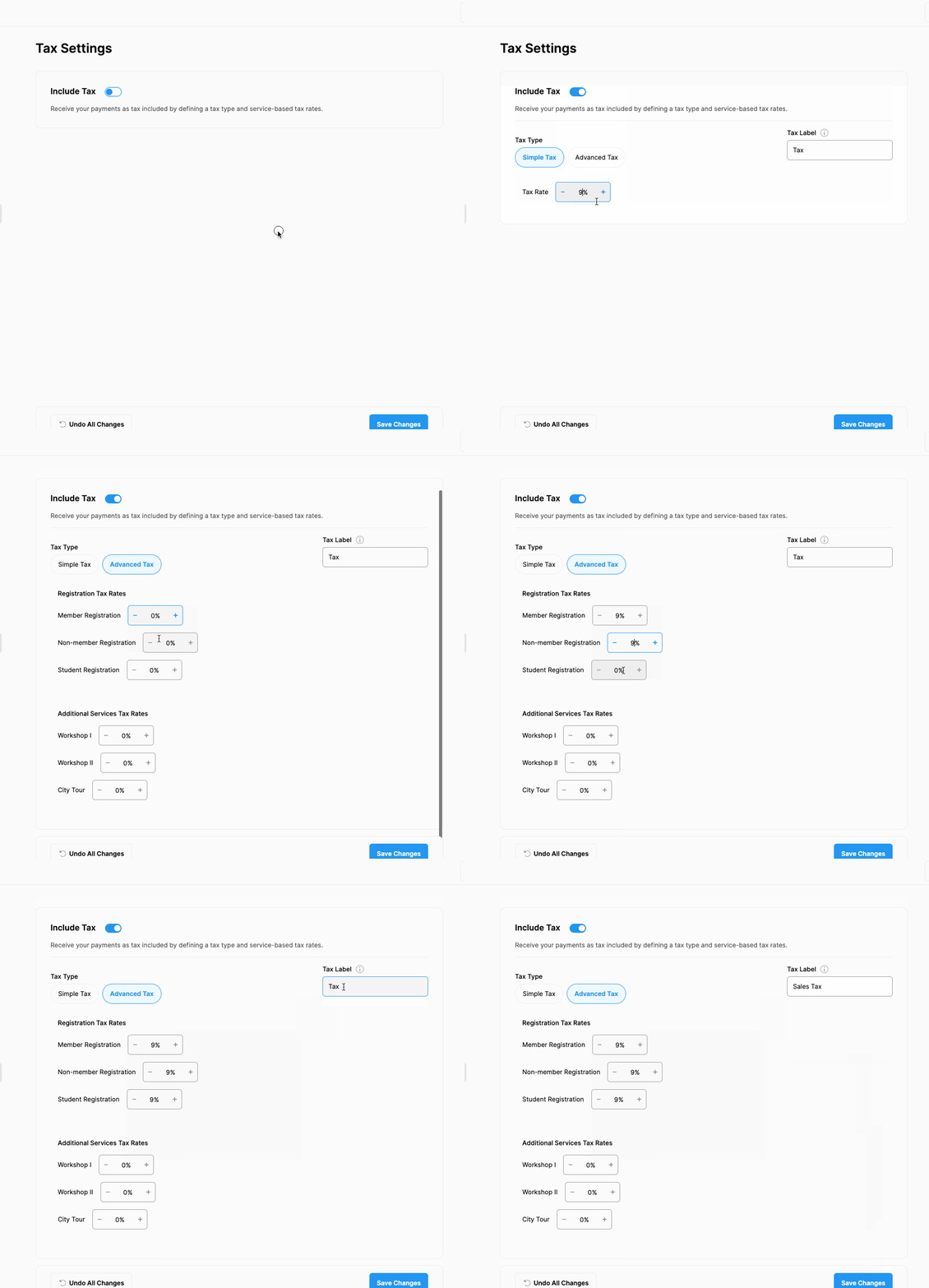
If you want to include tax in your fees, follow the steps below;
Click ‘Registration’ menu item from the left side menu,
Click ‘Tax Settings’ menu item under ‘’REGISTRATION,
Switch on the ‘Include Tax’ option,
Give a name to the tax like VAT, etc. in the ‘Tax Label’ field.
Choose the ‘Simple Tax’ button to add a common tax rate or,
Choose the ‘Advance Tax’ button to define custom tax rates for each service you sell,
Click the ‘Save Changes’ button.
Comments
0 comments
Please sign in to leave a comment.