
MeetingHand offers many question types that you can add to your registration form. You can choose any preset question such as an address, city, country, etc., or you can select a single line, file upload, number, etc. type and customize the question as you wish.
Adding Conditional Logic Questions
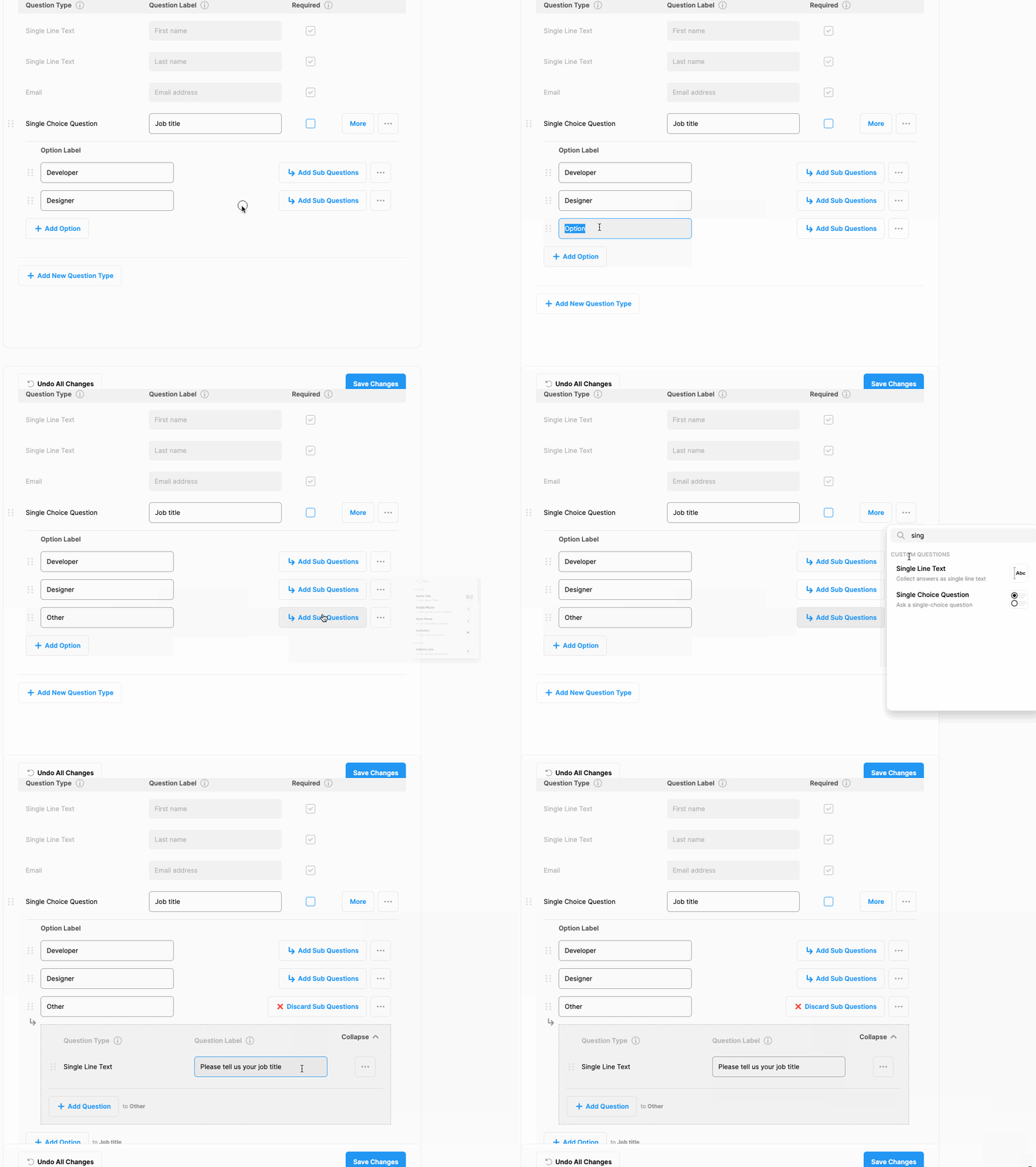
Depending on the answers to the ‘Single-Choice’ and ‘Multiple-Choice’ questions, successive sub-questions can be added if desired. Questions added in this way are called "Conditional Logic Questions".
To create a ‘Conditional Logic Question’ follow the steps below;
Click ‘Registration’ menu item from the left side menu,
Click ‘Questions & Information’ menu item under ‘’REGISTRATION,
Click the ‘Add New Question Type’ button,
Choose ‘Single-Choice’ or Multiple-Choice’ question type to add a question to your form,
Write the question first and then add the options,
Click the ‘Add Sub-Question’ button next to any option you wanted to ask a successive sub-question in case the relevant option was selected by the participant,
Choose a new question type to ask,
Customize the question and,
‘Save Changes’ or follow the steps above to continue adding conditional logic questions.
Comments
0 comments
Please sign in to leave a comment.